Creating Anki flashcards from koreanclass101 site

TL;DR: I created Anki collection by parsing koreanclass101.com web site content with python 3, extracted work-cards
with images and pronunciation sounds
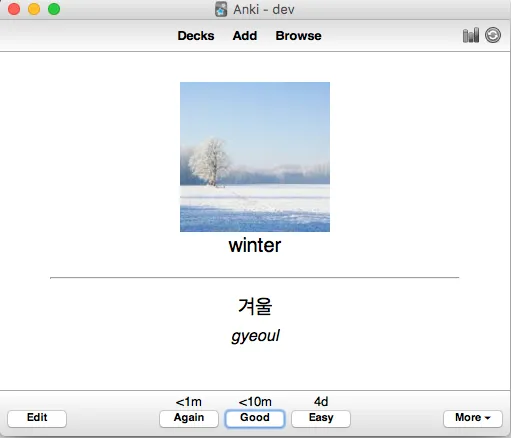
koreanclass101.apkg

Anki is a cool program, which makes easy to memorize anything.
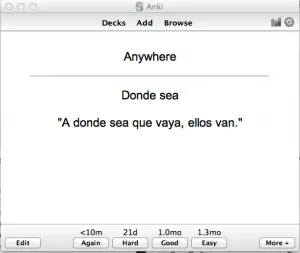
It’s free (but not for iOS) and cross-platform. I use it with foreign languages, to commit to memory large amounts of
words, but the main problem is to find good collection, that fits my needs. I want the collection to have an image
describing word, and a sound from native-speaker. Most shared free collections from
anki decks site are not as perfect.

The good way to create one is to find site for students learning the language, and write a program which will go
through pages, collect data and save the deck. So, we need to know, how Anki collection is structured, and how to
extract information from the web page. Luckily Anki is open source and web sites usually have clear HTML structure,
so it is not as difficult as it sounds.

Anki collection is a file with .apkg extension. It is just zip archive contains media files (they do not have
extensions and their names are just numbers), and two files: media (contain media files index), and collection.anki2
which is an SQLite database file.


I will be using python 3 as it really good for such problems. So the first step is to create some folder (let its name
be data) and create SQlite database file

1
2
3
4
5
6
import os
import shutil
DATA_DIR = "data"
if os.path.exists(DATA_DIR):
shutil.rmtree(DATA_DIR)
os.makedirs(DATA_DIR)

Each time script run it will destroy the folder and create it again. I created a number of constants and simple class
to work with database

1
2
3
4
5
6
7
8
9
10
11
12
13
14
15
16
17
18
19
20
21
22
23
24
25
26
27
28
29
30
31
32
33
34
35
36
37
38
39
40
41
42
43
44
45
46
47
48
49
50
51
52
53
54
55
56
57
58
59
60
61
62
63
64
65
66
ANKI_TABLE_CARDS = """CREATE TABLE cards (
id integer primary key,
nid integer not null,
...)"""

ANKI_TABLE_COL = """CREATE TABLE col (
id integer primary key,
...)"""

ANKI_TABLE_GRAVES = """CREATE TABLE graves (
usn integer not null,
..)"""

ANKI_TABLE_REVLOG = """CREATE TABLE revlog (
id integer primary key,
...)"""

class AnkiDB(object):
"""Sqlite DB connection and methods to add table rows"""
def __init__(self):
self.__note_id = 1507066959583
# starting ids of table rows
self.__card_id = 1507066980998
self.__card_due = 1 # create db connection
self.__conn = sqlite3.connect(\
DATA_DIR + "/collection.anki2")
self.__cursor = self.__conn.cursor()

# create tables
self.__cursor.execute(ANKI_TABLE_CARDS)
self.__cursor.execute(ANKI_TABLE_COL)
self.__cursor.execute(ANKI_TABLE_GRAVES)
self.__cursor.execute(ANKI_TABLE_NOTES)
self.__cursor.execute(ANKI_TABLE_REVLOG)

# create indexes
self.__cursor.execute(\
"CREATE INDEX ix_cards_nid on cards (nid)")
self.__cursor.execute(\
"CREATE INDEX ix_cards_sched on cards (did, queue, due)")
self.__cursor.execute(\
"CREATE INDEX ix_cards_usn on cards (usn)")
self.__cursor.execute(\
"CREATE INDEX ix_notes_csum on notes (csum)")
self.__cursor.execute(\
"CREATE INDEX ix_notes_usn on notes (usn)")

# create one row in table `col` with card model
self.__init_col()

def __init_col(self):
"""Create one row in table `col` with anki model data"""
col_id = 1
col_crt = 1428368400
...
self.__cursor.execute(\
"""INSERT INTO col (id, crt, mod,
scm, ver, dty,
usn, ls, conf,
models, decks,
dconf, tags)
VALUES (?,?,?,?,?,?,?,?,?,?,?,?,?)""",
(col_id, col_crt, col_mod,
col_scm, col_ver, col_dty,
col_usn, col_ls, col_conf,
col_models, col_decks, col_dconf, col_tags))

Lets take a look on koreanclass101 web site, which we are using as a target.

Every day it provides a free korean word, with url like
https://www.koreanclass101.com/korean-phrases/10302017?meaning

We can see there is a date in the URL (10302017 – October 30th, 2017), and korean word, sound, image and translation
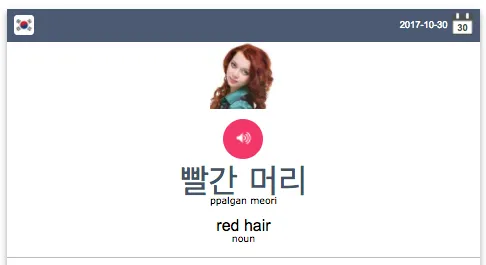
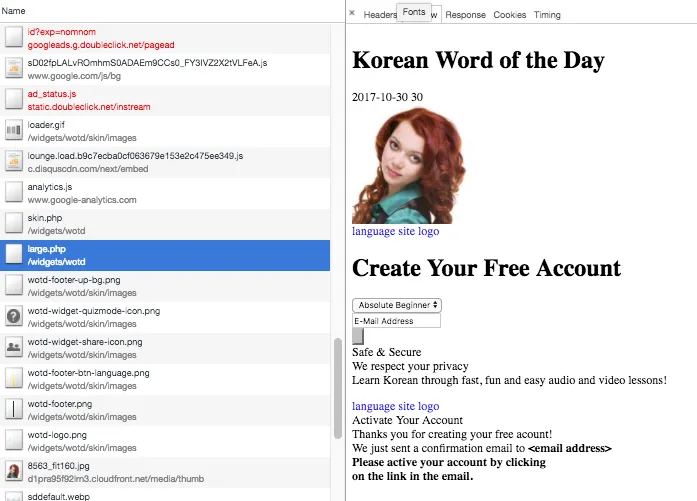
But when we look closer, we see there is no such content in HTML. Actually there is JS code, that makes POST request on
URL /widgets/wotd/large.php with form data (language=Korean&date=2017–10–30). The answer is the piece of HTML displayed
above, so we can just make POST request for each date and parse the HTML we need.
We will start from June 10’th of 2013 (all cards before have invalid images). Simple python date iterator will be as following:

1
2
3
4
5
6
7
8
9
10
11
12
13
from datetime import datetime, timedelta

def daterange(start_date, end_date):
"""creates generator with dates"""
for n in range(int ((end_date - start_date).days)):
yield start_date + timedelta(n)

START_DATE = datetime.strptime("06102013", "%m%d%Y")
END_DATE = datetime.strptime("10182017", "%m%d%Y")

# usage:
for date in daterange(START_DATE, END_DATE):
# do something with date

For each date we will download HTML using POST request

1
2
3
4
5
6
7
8
9
10
11
def make_post_data(date):
""" creates structure to pass as form data
for koreakclass101 url"""
return {"language": "Korean", "date": date.strftime("%Y-%m-%d")}
def load_card_from_net(data):
"""load and parse card on given date, returns Card object"""
url = "https://www.koreanclass101.com/widgets/wotd/large.php"
enc_data = urllib.parse.urlencode(make_post_data(date))
f = urllib.request.urlopen(url, enc_data.encode("utf-8"))
html = f.read().decode("utf-8")
return html

Lets create a plain python object with public fields to contain one card information and few help methods

1
2
3
4
5
6
7
8
9
10
11
12
class Card(object):
def __init__(self):
self.korean = '' # word in korean
self.english = '' # word in english
self.korean_sound = '' # url of sound file name (mp3)
self.image = '' # url image file name
self.romanization = '' # transcription
self.pos = '' # part of speech
def get_image_file_name(self):
return os.path.split(self.image)[1]
def get_sound_file_name(self):
return os.path.split(self.korean_sound)[1]

The parser collects data from HTML and fill the Card object fields. We will be using html.parser python package.
To distinguish numerous of <div> elements, we’ll be using class variable __div_classes that collects path in DOM-tree
of class names for each div. So, when entering <div> element we push its class name, and when exit — remove it from
the list.

1
2
3
4
5
6
7
8
9
10
11
12
13
14
15
16
17
18
19
20
21
22
23
24
25
26
27
28
29
30
31
32
33
34
35
36
37
38
39
40
41
42
43
44
45
46
47
from html.parser import HTMLParser

class Koreanclass101Parser(HTMLParser):
"""Parse HTML with card data, resulting in
public field `card`"""

def __init__(self):
super().__init__()
self.__div_classes = [] # stack of classnames
# for each div/span
self.card = Card()

def handle_starttag(self, tag, attrs):
"""callback for opening tag, collect path"""
hattrs = dict(attrs) # tag attributes
class_name = hattrs["class"] if "class" in hattrs else ""
if tag == "div" or tag == "span":
self.__div_classes.append(class_name)
if tag == "a" and \
class_name == "wotd-widget-sentence-space-sound" and \
self.__div_classes[-1] == "...":
self.card.korean_sound = hattrs["href"]
if tag == "img" and \
self.__div_classes[-1] == "wotd-images-space":
self.card.image = hattrs["src"]

def handle_endtag(self, tag):
"""callback for closing tag"""
if tag == "div" or tag == "span":
del self.__div_classes[-1] # remove last
# classname from stack

def handle_data(self, data):
"""callback for tags content"""
if len(self.__div_classes) == 0:
return
if self.__div_classes[-1] == "wotd-main-space-text" and \
self.__div_classes[-2] == "wotd-main-space":
self.card.korean = data
if self.__div_classes[-1] == "wotd-space-text" and\
self.__div_classes[-2] == "wotd-quizmode-space" and \
self.__div_classes[-3] == "wotd-up-inner":
self.card.english = data

parser = Koreanclass101Parser()
parser.feed(html)
# parser.card is the new card

Saving card to database is quite easy. All the cards have two variants (one show english word and asks about korean
translation, other shows korean word and wait ith translation into english). We have to add 2 rows into table ‘card
and one into table ‘notes’. Card fields go to column ‘flds’ (string) of table ‘notes’, separated by “\x1f” char.
They must be in predefined order, described in table ‘col’ which we created earler in field ‘model’ which contains
JSON like that:

1
2
3
4
5
6
7
"flds": [ 
{"name": "korean": "Malgun Gothic", ...},
{"name": "english”, "font": "Helvetica", ...},
{"name": "korean-sound", ...},
{"name": "img", ...},
{"name": "romanization", ...}
],

All the new rows must have unique id, so we will save the id of first entry and increment it manually. Also we save
part of speech of the word (noun, verb, etc…) to field tags.

So, here two new methods in class AnkiDB

1
2
3
4
5
6
7
8
9
10
11
12
13
14
15
16
17
18
19
20
21
22
23
24
25
26
27
28
29
30
31
32
33
34
35
36
37
38
39
40
41
42
43
44
45
46
47
48
49
50
51
52
53
54
55
56
57
58
59
60
def __add_node(self, card):
""" saves one entry to db table `notes`
and returns the id of new entry"""
note_id = self.__autoincrement_note_id()
note_guid = guid64()
note_mid = ANKI_MODEL_ID
note_tags = card.pos # tags is space separated string
# ...
note_flds = "\x1f".join([
card.korean,
card.english,
"[sound:{0}]".format(card.get_sound_file_name()) \
if card.korean_sound else "",
'<img src="{0}" />'.format(card.get_image_file_name()),
card.romanization])
note_sfld = "{0} {1}".format(card.english, card.korean)
self.__cursor.execute(\
"""INSERT INTO notes (id, guid, mid,
mod, usn, tags,
flds, sfld, csum,
flags, data)
VALUES (?,?,?,?,?,?,?,?,?,?,?)""",
(note_id, note_guid, note_mid,
note_mod, note_usn, note_tags,
note_flds, note_sfld, note_csum,
note_flags, note_data))
return note_id

def add_card(self, card):
"""saves card to db: 3 rows, one for table `notes`
and two for table `cards`: front and back"""
note_id = self.__add_node(card) # first save note
card_id = self.__autoincrement_card_id()
card_nid = note_id
card_ord = 0
# ...
self.__cursor.execute(
"""INSERT INTO cards (id, nid, did,
ord, mod, usn,
lapses, left, odue,
odid, flags, data)
VALUES (?,?,?,?,?,?,?,?,?,?,?,?,?,?,?,?,?,?)""",
(card_id, card_nid, card_did,
card_ord, card_mod, card_usn,
card_lapses, card_left, card_odue,
card_odid, card_flags, card_data))
# next entry (reverse card) differs:
card_id = self.__autoincrement_card_id()
card_ord = 1
card_left = 0
self.__cursor.execute(
"""INSERT INTO cards (id, nid, did,
ord, mod, usn,
lapses, left, odue,
odid, flags, data)
VALUES (?,?,?,?,?,?,?,?,?,?,?,?,?,?,?,?,?,?)""",
(card_id, card_nid, card_did,
card_ord, card_mod, card_usn,
card_lapses, card_left, card_odue,
card_odid, card_flags, card_data))

For each card we download image and sound files. Their names must be just numbers, and for each file we have to add its
index to file named ‘media’ which contains JSON hash object like

1
2
3
4
5
6
{
"0": "8218_fit160.jpg",
"1": "18910.mp3",
"2": "8024_fit160.jpg",
...
}

So, lets create a class registers all the media files

1
2
3
4
5
6
7
8
9
10
11
12
13
14
15
16
17
18
19
20
21
22
23
24
25
26
class MediaRegistrar(object):
"""Register media files by names with unique id"""
def __init__(self):
self.__media_id = 0
self.__media = {} # hash of media files
# used in collection

def __autoincrement_media_id(self):
"""return next valid id"""
media_id = self.__media_id
self.__media_id += 1
return media_id

def register_media_file(self, file_name):
"""get next media id, register file_name with this id"""
media_id = self.__autoincrement_media_id()
self.__media[media_id] = file_name
return media_id

def save(self, filename):
"""saves the collection of media files names
as json to file"""
media_str = json.dumps(self.__media)
media_file = open(filename, "w")
media_file.write(media_str)
media_file.close()

And download media files

1
2
3
4
5
6
7
8
9
10
11
12
13
14
def download_media_files(card, media_registrar):
"""register card files in media_registrar and
saves with unique file names"""

image_file_id = media_registrar.register_media_file(
card.get_image_file_name())
urllib.request.urlretrieve(card.image,
DATA_DIR + "/" + str(image_file_id))

if card.korean_sound: # some cards do not have sound
sound_file_id = media_registrar.register_media_file(
card.get_sound_file_name())
urllib.request.urlretrieve(card.korean_sound,
DATA_DIR + "/" + str(sound_file_id))

The final step is to zip each file in data folder into one archive. This can also be done with python

1
2
3
4
5
6
7
8
9
10
11
12
13
z = ZipFile("koreanclass101.apkg", "w")

# add sqlite file to archive
z.write(DATA_DIR + "/collection.anki2", "collection.anki2")

# and file `media` with json - all media files and id
z.write(DATA_DIR + "/media", "media"

# and every media file which name is their id
for media_file in media_registrar.files():
z.write(DATA_DIR + "/" + str(media_file), str(media_file))

z.close()

After successfull run (about 15 minutes) we have the job done
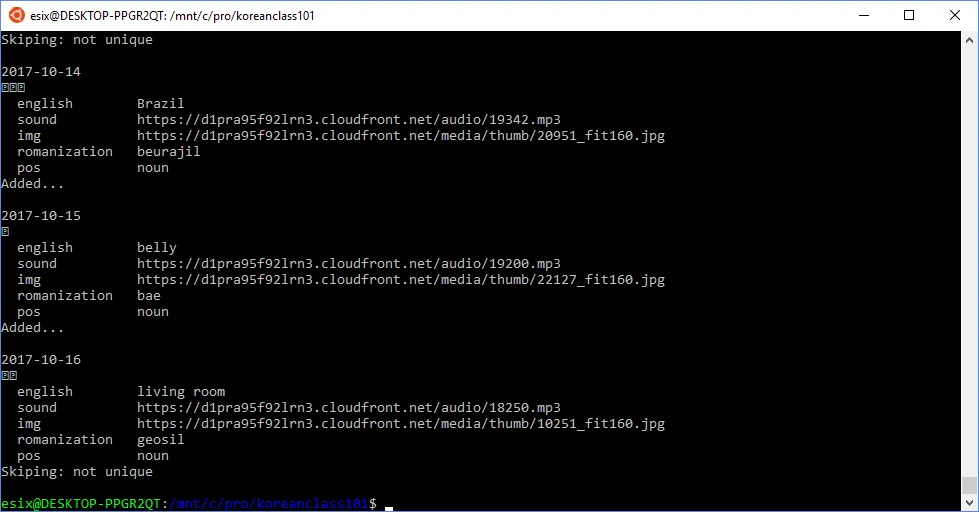
We have collected 613 unique words (total 1226 cards), so it can be a good start of learning Korean

Full source code:

Download ready deck at: